We remain fully operational. Our teams are working around the clock to ensure your deliveries continue safely.

DOWNLOAD THE APP


Customer Services
Copyright © 2025 Desertcart Holdings Limited
DOWNLOAD THE APP

🔥 Power, speed, and style in a compact white chassis — build the future now!
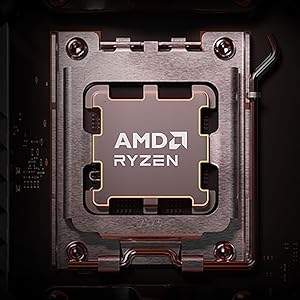
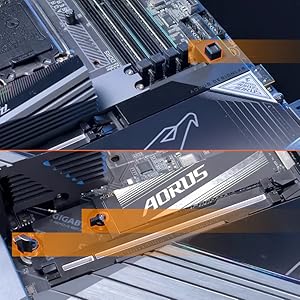
The GIGABYTE X870I AORUS PRO ICE is a premium Mini-ITX motherboard designed for AMD AM5 Ryzen 7000/8000/9000 series processors. Featuring DDR5 memory support, dual PCIe 5.0 M.2 slots with easy EZ-Latch installation, advanced 8+2+1 power phases with 110A Smart Power Stage, and next-gen connectivity including WiFi 7 and 2.5GbE LAN, it delivers top-tier performance in a sleek white design. Ideal for professionals and enthusiasts seeking a compact yet powerful build, it also offers DIY-friendly features and a reassuring 5-year warranty.





| ASIN | B083WG2VDF |
| Best Sellers Rank | #9 in Computer Motherboards |
| Brand | GIGABYTE |
| CPU Model | Ryzen 7 |
| CPU Socket | AM5 (LGA 1718) |
| Chipset Type | AMD X870 |
| Compatible Devices | Personal Computer |
| Compatible Processors | AMD Ryzen 9000 / Ryzen 8000 / Ryzen 7000 Series Processors |
| Customer Reviews | 4.2 out of 5 stars 80 Reviews |
| EU Spare Part Availability Duration | 5 Years |
| Graphics Card Interface | PCI Express |
| Main Power Connector Type | 24-Pin |
| Manufacturer | GIGABYTE |
| Memory Clock Speed | 5200 MHz |
| Memory Slots Available | 4 |
| Model Name | X870I AORUS PRO ICE |
| Model Number | X870I AORUS PRO ICE |
| Number of Ethernet Ports | 1 |
| Number of Ports | 17 |
| Platform | Windows, Windows 11 |
| Processor Socket | AM5 (LGA 1718) |
| RAM Memory Technology | DDR5 |
| Ram Memory Maximum Size | 128 GB |
| System Bus Standard Supported | SATA 6 |
| Total Number of HDMI Ports | 1 |
| Total PCIe Ports | 4 |
| Total SATA Ports | 4 |
| Total Usb Ports | 8 |
| UPC | 889523045930 |
| Warranty Description | 5 Year Manufacturer |
N**N
Very nice motherboard
It’s just a little more than the B850i version but added the X870 chipset and includes a second usbc port. It was worth the extra $20 to me. On top of it it is the white version so you are not just paying extra for it to be white so I liked that. I don’t like the placement of the audio port for the front panel audio. It gets in the way and makes it hard to cleanly route that cable. I do really like the easy latch for the ssd on the front of the board but the fan on it is absolutely horrible with the default fan curve. Use a fan control software to adjust it so it’s bearable and you don’t have to worry about the issue. The quick release button for the GPU pcie slot is so amazing. It works great and it’s a feature I hope to see in future boards.
O**E
Only white X870 ITX board right now.
Used this board to build a white themed SFF build. Practicality the only white X870 itx motherboard out right now. Have had it for around a month running a 9800X3D with 32GB of ram at 6400mhz. Everything is great so far. My system runs great, and looks amazing. But it needed multiple bios updates, as it looked like my board came with a pre-release bios of some sort. I do have some minor complaints though. -No onboard RGB lighting, only RGB headers for other products. Though some people would consider this a win. -VRMs run pretty warm without dedicated airflow over the heatsink. You would think that for $300 Gigabyte would engineer a better solution for the VRMs and chipset. I bought a cooper M.2 heatsink and plunked it on the side of the flat part of the heatsink above the VRMs (next to the CPU) with some thermal tape, just for some peace of mind. Makes it look prettier at least, lol. -The SSD fan runs at max speed by default, and is loud by nature. Definitely tune it down in BIOS when setting up. -No optical out audio, a standard audio port that has been included in virtually any other device for decades. Not really a big deal in the real world, but I don't get why they didn't include it. There is clearly room on the back of the board, and cost-savings on this board shouldn't be a concern for Gigabyte. -No built-in temperature probe headers for adding thermal sensors around your system. This means that if you decide to watercool your system, like I did, you'll have to rely on traditional thermal sensors on the board instead to control pumps and fans. Which means you are gonna need to take some extra time and patience to tune your cooling setup for your noise to performance preference. On my other water-cooled builds, I used fittings with embedded thermal sensors monitoring coolant temperature to control all my fans/pumps. Every one of them was dead silent for that reason. Again for $300, I would expect for Gigabyte to spare the extra few cents in manufacturing for a two-pin header that literally exists on their other boards from previous generations. Why they forgot to include at least one, in an expensive enthusiast motherboard, is beyond me. I got around this in my build by controlling everything with the VRM's temperature. Solid and stable motherboard overall. It's pricey though, and there is not much to differentiate it from B850 boards to justify a $300 price tag, in my opinion.
P**R
It Works.
I haven't run into any issues with the motherboard. I must be lucky because I haven't heard any whine or unpleasant noise from the SSD fan. My previous motherboard was an ASRock B850I Lightning on BIOS 3.25 and it killed my Ryzen 9 9900X within a week. I've had this motherboard for almost a month and no issues at all. The installation is a little wonky. It's pretty straightforward if you've ever put a PC together, but they use a long screw to mount to the PC case on one of the corners. They also use a different method to connect either the CPU or chassis fan to the motherboard, it uses some small pin connectors that then turn into the standard 4-pin connector. The WiFi connector kind of sucks, but I don't use WiFi anyway so it's no big deal to me. If you could spend more money, consider an Asus motherboard, but if you can't spend the extra hundred or so then this is a very nice motherboard. Boot times do seem kind of slow, however. I had quicker boot times with the ASRock motherboard, but it's still fine.
B**G
Not like this - Unstable with problems
I purchased two of these motherboards. They both are unstable and I had two CPUs fail. Furthermore, one of the SSD heatsink fans developed a significant whine. Also, a custom cable for the the case fan connector is inconvenient. Gigabyte generally makes good products, but I would avoid this one.
D**G
argb and fan headers start having issues near wattage limit
Received the REV1.1 board which is nice as it comes with some future proofing. Everything works exactly as it should but there are a couple things that don't allow it to 5 star. First, the gigabyte website makes it super difficult to find the board layout and the diagram did not come in the box. Second and more importantly, once I found it, the rail amp/wattage limits for each fan header and argb header show 2A 24W max for fan header and 3A 5V for argb header. I was using 5 fans on the sys fan header and mixed the argb between the two argb headers. System didn't like this and argb was going crazy. The fans DO work in this setup, so might just be some issues with the argb headers not actually meeting their rated spec because some fans were blinking wildly and after unplugging some, went to working properly. So, if you want to plug in more than 3 fan/argb per header, you'll also need a powered hub. I checked my fan/argb specifications and there was room for 6 at max wattage pull so 5 should have been fine, but it isn't.
J**Y
Worked great for my build
I bought this Pro Ice Mini ITX board because it was the only option I could find with USB 4 support. I weighed it against the ROG boards, and I would have to have a weird daughter board with a external connector, which I found super unappealing, so I settled on this one. I have no regrets at all with my decision. My computer build went very smooth and my EXPO memory settings were correctly detected and applied (G.Skill Flare X5 6000MT/s (DDR5-6000 CL30-36-36-96 1.35V, Matte White, 96GB (2X 48GB)). I'm running this board with a 9950X3D and 7900XTX and living the team red dream in June of 2025. The UEFI is fine. Stability seems great, no issues I can think of. I do have however one big complaint with this board: No driver support for the WiFi 7 chipset for Windows 10. I'm very tempted to drop a star for this, but I won't. I wish GIGABYTE would release Windows 10 compatible drivers for the WiFi chipset, but other than that, everything is excellent. I could of course use some kind of external antenna and keep using Windows 10, but I decided to just jump to 11 and not tie up any of my USB ports. I will cope with Windows 11 until SteamOS has broader compatibility and then jump ship from the atrocity that is Windows 11. Overall, this motherboard has been great, and I would recommend it to anyone looking for a AM5 motherboard with WiFi 7 and USB4.
A**N
Best option for white itx build
Small, white, for future Best option for white itx builds Support everything you need(except Intel processors, 3 of ssd m.2, 2 gpu's. Nothing too crazy) Has everything you need in the box (unfortunately I didn't got how to screw down the last screw, there were two screws in the box, but they were too long for the build, I just cutted them.)
M**Z
It's ok, but nothing special. Get it for the right price.
Was able to get it slightly cheaper than the B850i motherboard from Gigabyte. For the price and being an x870 chipset, it should have a clear CMOS button. It failed once to recognize my NVME drive, but fixed it after reseating the drive and clearing CMOS. Works well with a Ryzen 7800x3d and Radeon RX 9070 XT. My RAM is Team Group C38 with 6000 MHz (not really "fast") but EXPO works with no issues. Came with FA4 bios, updated it to FA5b.
Trustpilot
3 weeks ago
1 month ago