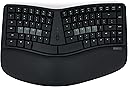
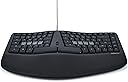
⌨️ Elevate your typing game with ergonomic precision and programmable power!
The KINESIS mWave Ergonomic Keyboard for PC combines a classic wave layout with premium low-profile mechanical switches, offering superior comfort and durability. Featuring dual Bluetooth and USB-C connectivity, it supports seamless device switching without dongles. Its fully programmable keys and customizable backlighting empower professionals to optimize productivity in any lighting environment. Designed specifically for Windows users, the keyboard includes dedicated hotkeys, a magnetic negative tilt option, and an integrated numeric keypad—all wrapped in a sleek black polycarbonate chassis with a 2-year warranty.


| ASIN | B0DYG1KPX7 |
| Additional Features | Backlit, Ergonomic, Hotkeys and Media Keys, Programmable Keys, Wrist Rest |
| Antenna Location | Office |
| Best Sellers Rank | #136 in Computer Keyboards |
| Brand | KINESIS |
| Built-In Media | 3 Negative Tilt Feet (Magnetic), USB Cable |
| Compatible Devices | Laptop, PC, Smartphone, Tablet |
| Connectivity Technology | Bluetooth, USB-C |
| Customer Reviews | 4.0 out of 5 stars 75 Reviews |
| Enclosure Material | Polycarbonate |
| Hand Orientation | Ambidextrous |
| Item Dimensions L x W x H | 15.25"L x 9.5"W x 1.75"H |
| Keyboard Backlighting Color Support | Single Color |
| Keyboard Description | Mechanical |
| Keyboard Layout | QWERTY |
| Manufacturer | Kinesis |
| Mechanical Keyboard Switch Model | gateron_brown |
| Model Name | mWave Mechanical Keyboard for PC |
| Model Number | KB150P-TAC |
| Number of Keys | 85 |
| Power Source | Battery Powered |
| Recommended Uses For Product | Office |
| Special Feature | Backlit, Ergonomic, Hotkeys and Media Keys , Programmable Keys, Wrist Rest |
| Style Name | Windows (Black) |
| Switch Type | Tactile |
| UPC | 607998150023 |
| Unit Count | 1.0 Count |
| Warranty Description | 2 Year Manufacturer |
J**D
Would be perfect replacement for Microsoft Sculpt if only I could get it in black
I was upset when I accidentally ruined my Microsoft Sculpt keyboard a couple of years ago but positively crushed when I then learned Microsoft was no longer selling them. Proper ergonomics are important for me, but I prefer something that is relatively "standard" rather than any of the truly radical keyboard designs that are out there. I also didn't want to spend hundreds of dollars. After a lot of research, I ended up purchasing the Logitech Ergo K860 (https://www.amazon.com/dp/B07ZWK2TQT) which I liked fine, but not nearly as much as the Sculpt it replaced. Unfortunately the durability on my first K860 wasn't great and I had to replace it only 18 months later. I didn't want to buy from them again, but there just wasn't anything else out there that met my specifications so I moved forward and reordered hoping my first one had just been a dud. Eight months later I was thrilled to learn the mWave had been released and decided to order one despite there being no reviews available yet. I'm glad I did! After a couple weeks of daily usage I've come away very happy with the purchase and feel like this is truly the ideal replacement for the Sculpt. The keyboard feels substantial and I like the negative tilt that can be achieved with the legs it includes. Important to note the tilt angle is "all or nothing" as there are no adjustments possible. A few things really set the keyboard apart from the Sculpt in a good way. The first is the the fact it is mechanical keys rather than the chiclet style. I have become more enamored of the feel and travel of mechanical keyboards in recent years and though I won't claim to be super knowledgable about them this one matches other I own and enjoy in terms of noise level and quality. I have made a point of asking multiple people if they can hear me typing during videoconferences and the answer has always been a no. The keys make noise for sure, as do all mechanical keyboards I'm familiar with, but they are not overly noisy. The next item I love is the backlight. I will often work in a dark room so having the keys lit can be helpful. The lighting has three different levels ranging from dim to pretty bright and the latter is what I'm showing in the picture attached to this review. That picture was taken in a room with a lot of natural daytime light and the backlighting is clearly visible. Frankly, in a dark room it is too bright for my eyes and I go with the medium level. Finally, I love how the keyboard is customizable thanks to what appears to be powerful programming functionality. I have not done more than play around a little with the programming, but it is something I expect to take further advantage of in the weeks ahead. There is only one problem I have with the keyboard and that is I was forced to get it in white since I'm a Mac user. After a few weeks it isn't showing any grime, but I expect that to change over time. They are going to be releasing a kit that will allow you to convert a black Windows keyboard into a Mac keyboard, but that isn't available yet so I decided to just go with the white. If the mWave stands up to extensive usage it will be a great option at what I consider to be a very fair price ($120 as of this writing). If you loved the Sculpt I'm guessing you'll love the mWave
S**T
Good ergonomic feel with classic keyboard layout
Editing review after daily usage. While the spirit and features are excellent, there is still room to improve. The biggest area would be that it is a more compact layout than the older Microsoft ergonomic keyboards. If you have years of muscle memory you’re going to experience a lot of misclicks while you are switching over. Also it makes the arrow keys and shift buttons feel cramped but this is subjective as I am used to a larger keyboard. It would be great if Kinesis made a larger 1:1 variant of the old Microsoft boards with a full numpad and hot swappable keys. —— Absolutely happy with this keyboard. I've struggled to find other ergonomic options which capture a traditional keyboard layout (like older Microsoft ergonomic keyboards), while still providing features such as mechanical switches, programmability, etc. I enjoy the backlit keys, native Mac support, option for Bluetooth or wired, programmability, and optional tenting which does not get in the way (magnetically removed) if you do not wish to use it. The build quality is good and appears well thought out and designed. All the materials feel nice and seem sturdy so far. All in all, it is the keyboard I was hoping someone would make for years and I'm happy to have it.
X**O
Great for Microsoft Sculpt users
This keyboard is essentially a reprogrammable Microsoft Sculpt with several other quality of life features. The keyboard comes with a usb-a to usb-c cable, batteries, and magnetic legs for the keyboard if you want negative tilt like the Sculpt's magnetic stand. The palm rest is very comfortable, maybe even more than the Sculpt. The surface is much easier to clean as it's less porous, someone else described it as "sculpt feels a bit neoprene/foamy where the mwave feels kind of vinyl and plasticky". Typing on the keyboard will be slightly louder and "clacky" than a Sculpt but not enough to disturb people nearby. The layout is very similar and requires no effort to transition to if you can touch type on the Sculpt. The low profile brown switches feel smooth and tactile. I was afraid the switches would bother me since it theoretically has longer travel than the Sculpt's laptop style keys but in real use the difference is negligible and it was easy to adapt to. The Clique software is browser based (like VIA if you've used a QMK keyboard) and it's easy to use. It allows you to have momentary layer switching (hold a key to switch layers and release to return) and mod-tapping which is really convenient. You also have the option to use ZMK Studio instead if you prefer an offline solution but the UI isn't as convenient. The main downside with the softwares is you can't bind macros (sequence of multiple keypresses) to your keys unless you're willing to make your own ZMK keymap and flash it on your keyboard. That being said, I very much appreciate that I'm not limited to the Clique keymap editor and have the option to use the ZMK studio or flash my own firmware. That along with wired or dual bluetooth connectivity, persistent custom bindings, double AA instead of triple AAA for longer battery life, and the comfortable typing makes this keyboard a huge step up from the Sculpt for me.
K**N
Excellent keyboard - but not the best MSFT 4000 replacement, sadly...
First - for context, I've used a Microsoft ergo keyboard, yes the old 4000 mothership... for decades now. Since like 1951 it feels like. OK, not that long, history buffs, but I've used it for enough years… I've bought so many that I had them stashed ready to use, and my final one finally started giving out in early 2025. What on earth was I to do. So if you haven't fallen deeply, DEEPLY in love with a keyboard, this review may not help you, be aware. No problem, I think to myself, modern keyboards must be better, right? Turns out I'm an addict… Hard to find an adequate replacement. How hard could it be to make the perfect keyboard for us, the club of MS 4000 devotees? Alas... apparently very difficult. tl:dr The Kinesis keyboard has very good feel, but I can't get used to it. I can't afford the time to adjust, but if you're just starting your addiction journey, perhaps this is a great keyboard for you to learn to love. More detail for you MS 4000 lovers: Well built, high quality, overall it's a great keyboard. But if you're looking for 120 WPM+ performance, and letting your fingers keep up with your brain, and if you're like me, here's what you may encounter: For my big hands, sadly, I can't get into the smaller form factor. Even after a few weeks of practice, I find myself missing ctrl or alt key combos (and when moving very fast that's extremely costly to productivity). The key spacing is tight, and I like it. Going back to my still functional Microsoft 4000, I find that I really like the key spacing for most of the keys on the Kinesis. I just wish it had a massive right ctrl, shift, enter, backspace. I think that's what did me in, those keys being smaller and tightly packed, it just would take me too many weeks/months to get my speed back. If you're early career, I think this Kinesis board is amazing. If you're better at video games than me, and you can handle very precise thumb + finger combos to get ctrl + end or similar key strokes down, then you will love this Kinesis board, I bet. I want to love it. It's a really nice device. It's now a very expensive backup keyboard, or maybe my kids will start to love it. I hope you'll love it! Or, go checkout my current reco for MS 4000 lovers (a much lower-quality keyboard than this Kinesis, but it fits my needs better): SurnQiee Ergonomic Keyboard
M**.
Awesome value; great ergo keyboard.
An amazing keyboard for what it is -- arguably better built Microsoft Sculpt with mechanical switches, access to the seamless Kinesis customization software, and better connectivity. The switches are quieter than full sized browns. Generally, I couldn't be happier with the keyboard.
B**Y
Great replacement for Microsoft Sculpt
I am coming from the Microsoft Sculpt keyboard which I've used for years. Microsoft of course has stopped making such consumer hardware and sold the patents to Incase. I think Incase has produced a few units, but I haven't been able to get any. So I found this keyboard on a forum. So far it is great! I used the Bluetooth connectivity to my PC for a few days which worked great. I did start getting repeating keys and etc, but I believe that was my PC's fault, not the keyboard, and it needed a reboot. Since then I switched to wired using the provided (and LONG) USB A/C cable. (The keyboard has the USB-C connector). The Microsoft Sculpt was more of a laptop-type experience with the keys. I liked it ok and could type quickly on it. This keyboard is mechanical and much more "clacky." I don't hate that. The key travel is much more substantial and the spacing is subtly different. After about 3 days, I am nearly back up to full speed typing on it - expect a bit of a learning curve and a few bad keystrokes until your brain remaps your fingers for it, but stick with it. Key presses take a bit more effort but that is fine. I feel like the contour of the key layout and keyboard in general (shape of the curve) is better and more ergonomic. I am NOT a fan of the placement of the Home/End/Insert/Delete keys. I'm sure I will get used to it -- but KINESIS was clearly going for a replacement for the Sculpt and it seems an odd design choice to put these keys in such radically different places. Anyway, I would buy again. I am pleased with the price of this keyboard and believe it is certainly worth the same cost as the Sculpt. I'm glad I found it!
N**D
The perfect keyboard
They finally made the perfect keyboard for me!!! Comparison to some other keyboards I've owned: Kinesis Freestyle2: has good key physics, but could never quite get used to the "two pieces". They would inevitably get bumped into new positions all the time, making it impossible to develop muscle memory for where my hands should go relative to each other. Also, eventually the connector between the two pieces broke, making the unpredictable positions problem go from bad to worse. Perixx PERIDUO-406: The key action on this thing is terrible. Get a little dust in there and the key seizes up. Utterly frustrating. Microsoft Natural Ergonomic Keyboard: Prior to the Kinesis mWave, this was my all time favorite keyboard. Good key action, great ergonomics. However the big problem with it which is why I didn't go back to it was that it has a built in numeric keypad. Newsflash: most people don't need or want a keypad. Not only is it useless dead space, but if you're right handed, it pushes the mouse/trackball further to the right than needed. Your hand has to travel further. If your desk space is limited, as mine is, it causes your keyboard to also have to be positioned to the left of center instead of being centered on the desk. mWave is the answer to all the problems. And on top of that they were good enough to make a Mac version of it! Thank you!!
U**D
Low quality
Pretty low quality keyboard, all the keys felt loose and had a bad feeling to typing. The palm rest felt like cheap vinyl. If this was a $50 keyboard I’d understand, not for $120 this is really low quality. I returned it after using it for one day, because it just felt so cheap and bad to type on. The overall shape is pretty good and similar to the MS Sculpt, but the materials are really low quality.
Trustpilot
3 weeks ago
4 days ago