
DOWNLOAD THE APP


Customer Services
Copyright © 2025 Desertcart Holdings Limited
DOWNLOAD THE APP


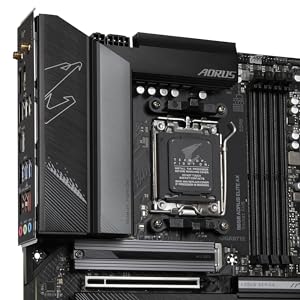
🚀 Power your ambition with the GIGABYTE B650 AORUS ELITE AX – where speed meets stability.
The GIGABYTE B650 AORUS ELITE AX is a high-performance ATX motherboard designed for AMD Ryzen 7000 series CPUs featuring the latest ZEN4 architecture. It boasts a robust 14+2+1 power phase design with advanced heat dissipation, triple M.2 slots including a PCIe 5.0 x4 NVMe slot for ultra-fast storage, and dual LAN connectivity (wired and wireless) to ensure seamless network performance. Supporting DDR5 memory up to 6666 MHz, this motherboard is engineered for gamers, professionals, and power users seeking reliable, cutting-edge performance.





| ASIN | B0BH7GTY9C |
| Amazon Bestseller | #226,064 in Computers ( See Top 100 in Computers ) #1,461 in Computer Motherboards |
| Are Batteries Included | No |
| Brand | GIGABYTE |
| Customer Reviews | 4.3 4.3 out of 5 stars (1,354) |
| Date First Available | October 11, 2022 |
| Graphics Card Interface | PCI Express |
| Item Weight | 1.94 Kilograms |
| Item dimensions W x H | 33.5 x 27 x 8 cm |
| Item model number | B650 AORUS ELITE AX |
| Manufacturer | GIGABYTE |
| Memory Clock Speed | 6666 MHz |
| Memory Technology | DDR5 |
| Number of USB 2.0 Ports | 2 |
| Processor Socket | Socket AM5 |
| Processor Type | Ryzen 7 |
| Product Dimensions | 33.48 x 26.97 x 7.98 cm; 1.94 kg |
C**G
問題なく使ってる
K**R
Problems booting.. Cannot enter bios enymore
Cannot enter in bios anymore, why? Idk Wish I could have my money back, but maybe now it is too late. I gonna keep with this hoping that nothing more than "I cannot update the firmware" and "I cannot boot normally" since mainly win11 is working, however I hope I dont need to install another OS soon..
T**N
This motherboard is packed with features, including Wi-Fi 6E, PCIe 5.0 support, and excellent build quality. The BIOS is intuitive, and the performance is rock solid. It’s a great foundation for any modern gaming rig.
V**A
Placa mãe muito bonita e também com um ótimo desempenho!
M**.
Great board, easy to update BIOS come working for 9000 series. Bluetooth gives me issues with golf sim, not sure if its board problem or me problem. Still working on that. Easy to navigate the BIOS like most others I have used.
N**T
Producto evaluado: Gigabyte B650 AORUS Elite AX $ $4,665.50 Me sorprendió mucho esta tarjeta madre, estoy contento con esta compra, sin ningún problema hasta ahora; tuve que modificar el "Precision Boost Overdrive (PBO)" de automático a 90 Level 5 para evitar que la temperatura del procesador (AMD Ryzen 5 7600) se fuera a 80º, y ahora al 100% llega a 64º y rinde un poco mejor (pruebas hechas con Cinebench 23). Lo único inconveniente que le veo es que fue mucho más cara con respecto al modelo para Intel, pero la verdad, me parece que valió la pena; además tiene un excelente manejo de temperaturas en toda la motherboard con una excelente disipación del calor. Muy recomendable esta tarjeta madre para AMD5
R**K
This review is for the GIGABYTE B650 AORUS Elite AX rev 1. I ordered this board because I was on an older Intel platform and I wanted to try an AMD build again. The AMD AM5 platform suits my needs since it has current modern features and is projected to have a long lifecycle and I anticipate my next upgrade to be in 5 years or so. The GIGABYTE B650 AORUS Elite AX was one the lesser expensive and full featured ATX boards with WiFi at the time of my purchase. My build includes: GIGABYTE B650 AORUS Elite AX Motherboard AMD Ryzen 7700X CPU Corsair Vengeance RGB RAM Zotac GTX 1080 AMP Edition First, my dislikes. No printed manual. As a lifelong pc builder, I rely heavily on a manual booklet for basic info such as what slots to install memory in. How to connect front panel power, reset, hdd status led etc. Where all of the headers such as USB and fans are located. Having an online manual is good but is useless if you don't have a spare computer or laptop to use while you build your computer. Thankfully I did not have to use the BIOS flashback feature because the board recognized my CPU, a Ryzen 7700X, otherwise I would have to go online, download the manual and look up the flashback instructions. For the price I do wish that the board included a higher end integrated audio chipset. Features-wise the audio chipset is the biggest disappointment. I did not like is the top most NVME slot right above the GPU slot has a really thick thermal adhesive pre-applied to the heatsink. It is so thick that it bends my NVME drive slightly - not enough to cause any issues but should be noted. One last thing I did not like is the lack of onboard BIOS post code status LED. I had this feature on my previous motherboard and found it super helpful when diagnosing problems. Now, for my likes. I like all of the features. AM5 socket, DDR5, WiFi6, PCIe 5.0, multiple NVMe slots, plenty of USB slots, and of course RGB support. The board itself is great. Build quality is awesome, no issues with build quality or materials. I did run into a few issues though. Although these issues were encountered with this motherboard, they are not Gigabyte's fault necessarily. These issues were mostly to do with the AMD platform and chipset itself. 1. The shipping BIOS "F2" version did not allow me to enable XMP memory profile. I had to flash the BIOS to the current at the time "F4" BIOS. Note that the current BIOS version as of this review is "F5a". 2. There were a lot of stability or problems with the USB chipset or bus. File transfers over USB were very slow or slower than it should be. I have USB DAC that had a lot of noise during audio playback. These issues were resolved by installing the latest chipset drivers for the B650 from AMD directly and also updating the BIOS. Here are some recommendations based on my experience with the GIGABYTE B650 AORUS Elite AX. Definitely update the BIOS. In past generations of motherboards it is only recommended to update the BIOS to fix a specific issue you've encountered. However, in modern motherboards there are so many chipsets and features that it is important to keep up to date on BIOS versions to maintain stability, performance, compatibility, and security. AMD seems to release AGESA updates (as BIOS updates) often and this is directly tied to the chipset. Also, download the chipset drivers directly from AMD because they tend to be more up to date than the motherboard manufacturers' website. To flash the bios, just download the BIOS file for your motherboard from Gigabyte's website and extract/copy the file to a USB drive. Reboot and enter the bios and choose Q-Flash. Select the BIOS, and the board will load the BIOS to memory then prompt for a reboot and apply the new BIOS. Aside from the chipset drivers, all other motherboard drivers can be downloaded and installed from Gigabyte. Ever since, updating the BIOS and AMD chipset drivers, I have had absolutely zero issues. Performance is amazing. Stability is solid. I even run a mild overclock using the AMD Ryzen Master app and doing an auto-oc. In summary, I highly recommend the GIGABYTE B650 AORUS Elite AX if you're looking for an AM5 build. The issues I've had are specific to the AMD platform and not the motherboard itself, however because of this I would not recommend the AMD platform for novice PC builders or if you are not comfortable or familiar with BIOS updates and troubleshooting driver issues.
Trustpilot
1 day ago
1 month ago