Desert Online General Trading LLC
Dubai, United Arab Emirates
Desert Online General Trading LLC
Dubai, United Arab Emirates


✨ Make Every Seat Special!
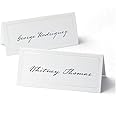
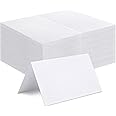
Gartner Studios White Pearl Place Cards are elegant, customizable table cards designed to enhance your event's aesthetic. Each card features a stunning white pearl foil border and is compatible with laser and inkjet printers, allowing for easy personalization. The pack includes 48 cards, each measuring 3.75” x 1.75” when folded, ensuring your guests feel welcomed and appreciated.


| Manufacturer | Gartner Studios |
| Brand | Gartner Studios |
| Item Weight | 0.634 ounces |
| Product Dimensions | 2 x 4 x 8 inches |
| Item model number | 83001 |
| Is Discontinued By Manufacturer | No |
| Color | White Pearl |
| Material Type | Paper |
| Pre-printed | thank you |
| Number of Items | 1 |
| Size | 48 Count (Pack of 1) |
| Manufacturer Part Number | 83001 |
B**R
Just what you need
I was hosting a table at a formal awards banquet. A set of ten colleagues from a professional association were all going to sit at my table. But most did not know each other. So, rather than having them sit at random places at the table, I carefully put compatible personalities next to each other. These simple, thick, and elegant place cards were easily used to direct attendees where to sit at my table. People are conditioned to do what the cards say, so everyone sat where I intended and had great time. Great value for the cost!
C**Y
professional result
The place cards are a nice heavy weight and were easy to fold and tear apart along the perforated edges, leaving a nice clean edge. The end result was a very professional product. The problem is the template from Gartner Studios. The first page is correct but the following pages do not line up. I duplicated the first page and typed all of the information on each duplicated template. I saved it on a flash drive and took it to Office Depot where they printed it for me. It took them a few tries on regular paper to make sure they loaded it correctly to print on the correct part of the page and they must load it one page at a time. It was all worth all of the effort, but allow an extra sheet of place cards for any mistakes and don't rush.
J**E
very classy, easy to print on our HP printer, quite a polished end product
I was put in charge of doing the place cards for our daughter's bridal shower/luncheon. This product came with a complete guidance text on where to go to download a template, and from there the process was painless and gave us total satisfaction. If only making the corsages were as easy....
M**Y
Classy & Beautiful
These saved us a lot of time, and the final product looked great. The template was easy to use. I did have some trouble print them though. I had to feed them through one page at a time or it would jam. Quality, thick cardstock with clean perforation.
A**R
Ink jet compatible
These work in my ink jet printer. Added a touch of class to our dinner.
L**K
The Templates are a COMPLETE MESS
The quality of the product is good, but their templates are a mess. The first page of 8 is th only one that printed correctly, even though all the papers were inserted exactly the same, all facing the same direction. This is 100% a problem with the template. All I did was insert the names where John Doe table 1 was written, on the entire template, then inert 8 papers all facing the same way, and hit print. Only the first page was aligned properly but there after all the other names were printed in the wrong area on the paper. In other words, you woul be better off only using the first page on the template, and then keep on printing that page and changing the names after each print. I am going to buy one more pack (good for them) because otherwise I have nothing and I am running out of options, But I will never after that purchase from this company and I would advise to stay away as you end up wasting paper and not because of your doing.
R**K
PRINTING TEMPLATE
The company has a website you can download their template. Makes printing easy !!!
R**V
Okay, not awesome. For the price, about what I expected and are pretty good.
I've been using these for a couple of years now. I've run dozens of sheets through my printer with no problems so far. The good - reasonably heavy stock, nice little gilded border, good color, easy to handle and load in my printer, inexpensive.The bad - perforated separation lines are only fair, when you separate them it may leave a little fuzzy on the edge, not super nice just okay (but for the price, what do you expect?)Here are some tips - 1. Forget their Word template, do what I did - use some plain printer paper, and just eyeball where you think the names should go and type in some names in whatever font and color you like. 2. Print a test on the plain paper and hold it up against the Gardner sheet until you can see that the names align with the card faces. 3. Mark a piece of plain paper with an X on the top of the front side and run it through the printer to make sure which side gets printed with the names - load the Gardner the same way. 4. Load one sheet of Gardner at a time - don't load multiple sheets. 5. All you have to do is same the Word template and you can change the names the next time you need to print some cards up. It's really not complicated, just takes a few minutes and some careful juggling of the print areas.Anyway, good product for the price. If I want super-duper looking cards I'll hire a printer.
Trustpilot
2 months ago
5 days ago
2 weeks ago
2 weeks ago